The NestPlus workspace
We're building the AI layer for retail and construction.
Every project already runs here — the programme on three tracks, the 3D model in your pocket, the leasing, the numbers. All of it in one place, one version, for everyone. That is the hard part, and it is done.
What comes next is teaching it to watch all of that for you: to read what lands in the inbox, check an invoice against the contract before anyone opens it, and say early where the finish date and the final budget are really heading. The groundwork is running today — scheduled, rule-based and already useful. The intelligence sits on top of it.
The app and the website show the same data — use whichever suits you. iPhone install goes through Apple's TestFlight; iOS 15 or later.
01 · Schedule
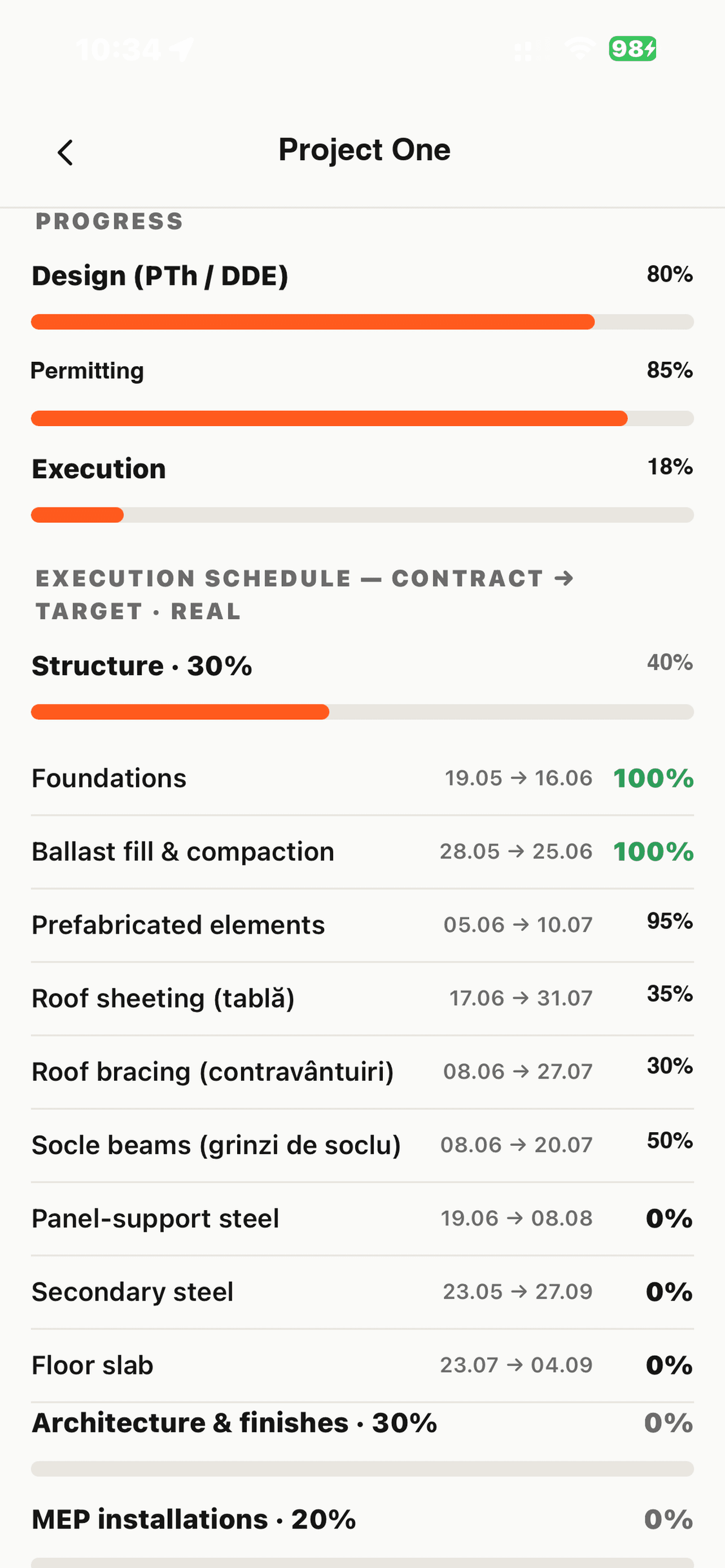
The time management of the project — three tracks on one bar.
Every activity carries the contractual date, the current target and what has actually been done, at the same time. The gap between the three is the whole point: a slip is obvious the day it appears rather than at the next meeting.
Sections for design, permitting and execution, each with its own weight in the overall percentage. Any line becomes a task with an owner and a deadline, and every change to an official date is logged with who moved it.
📊 Contract · target · real
The contractual programme stays fixed as the reference. Annexes come in as new versions rather than overwriting history, so you can put this month's target next to what was signed and see exactly what moved.
02 · Construction Management
What actually happened on site, the day it happened.
The daily site report and the works journal: the weather, how many people were working and which companies were on site, the concrete poured, the quantities of steel and materials placed.
Progress against programme sits alongside it, and the site cameras stream in the same place — so you can look at the site before you ask about it. One version, the same for everyone.
🏗 One version, in the open
The journal is published in the workspace rather than mailed round as attachments, so the site, the office and the investor are reading the same day's report. Capturing it straight from the phone on site is the next step.
03 · Plans & BIM
Implementation tracked on the drawing itself.
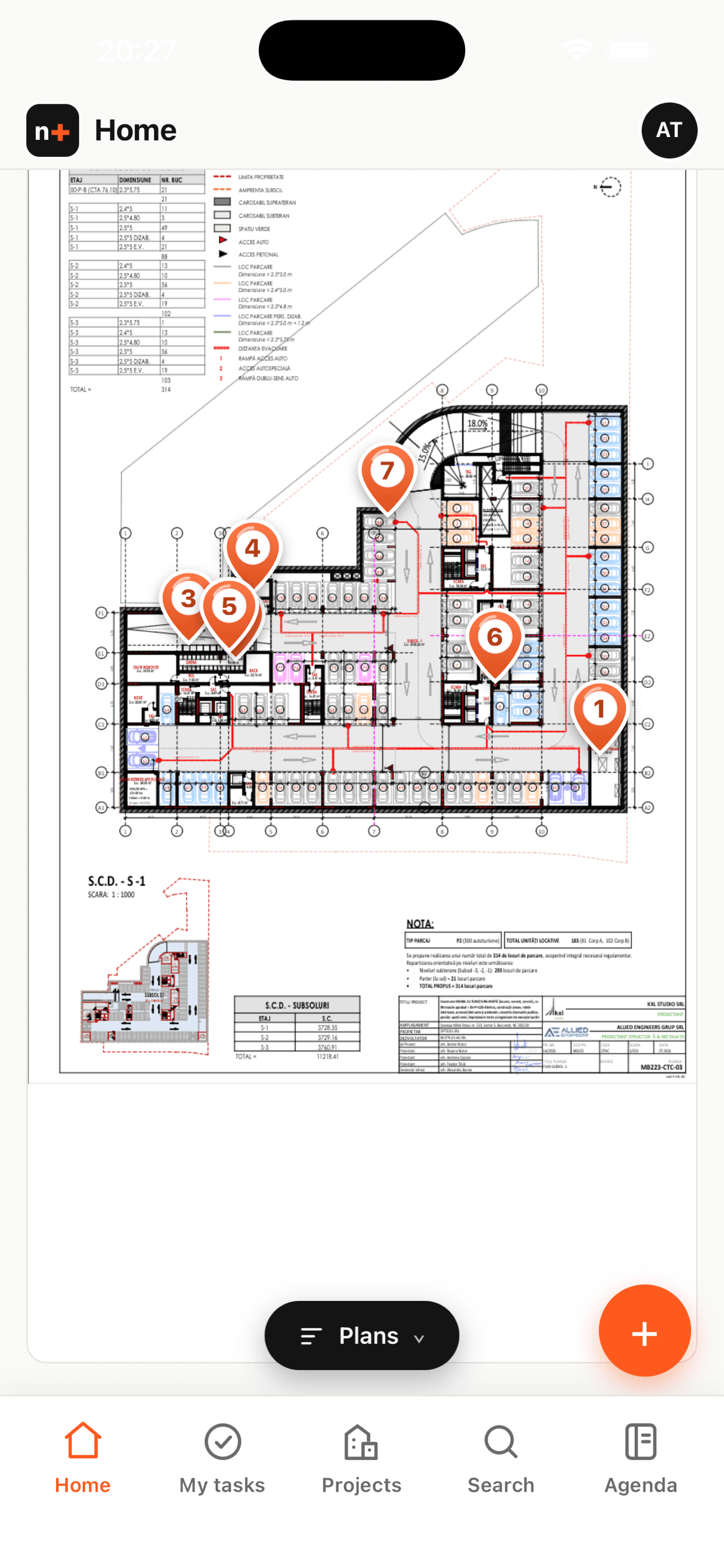
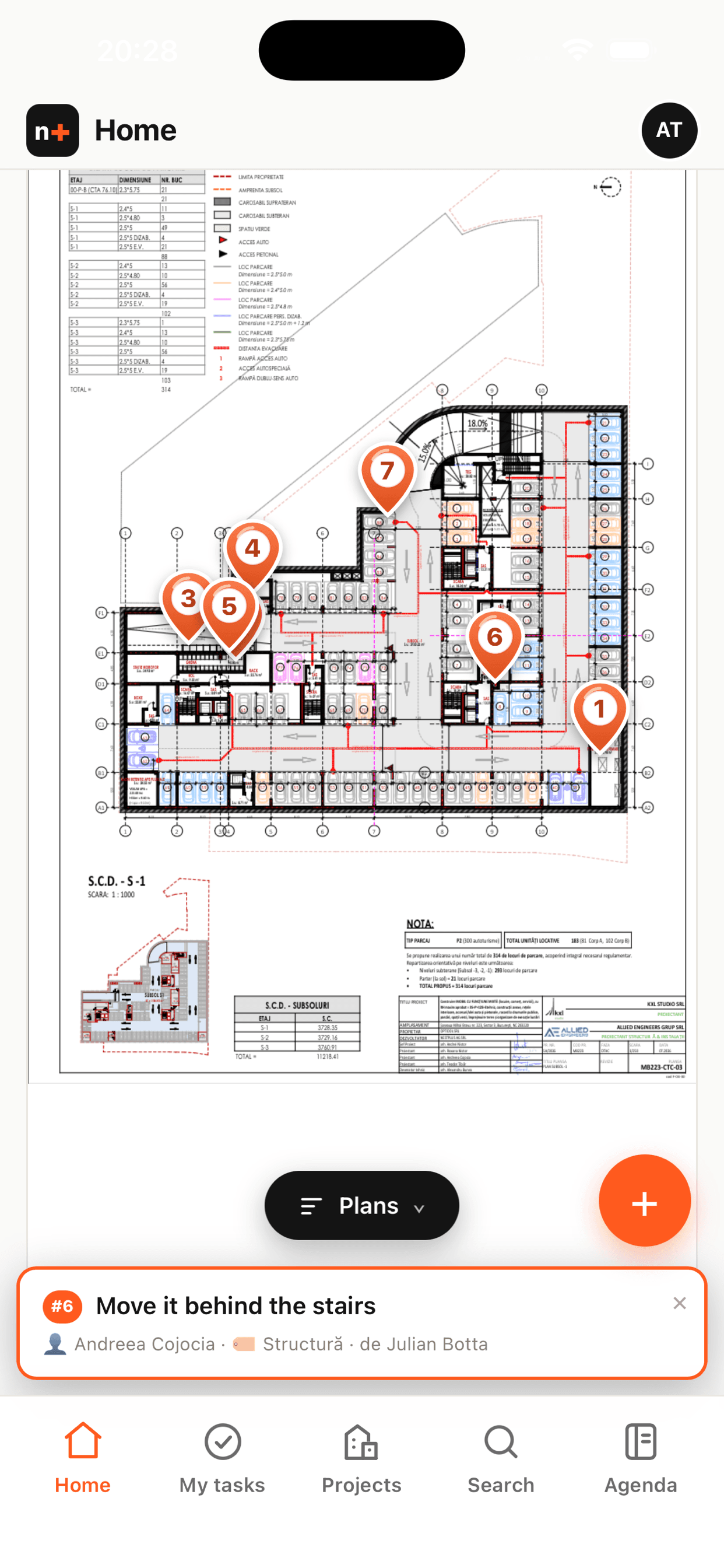
Project drawings with observations pinned straight onto the plan, organised in folders by discipline and version, so the current revision is never in doubt.
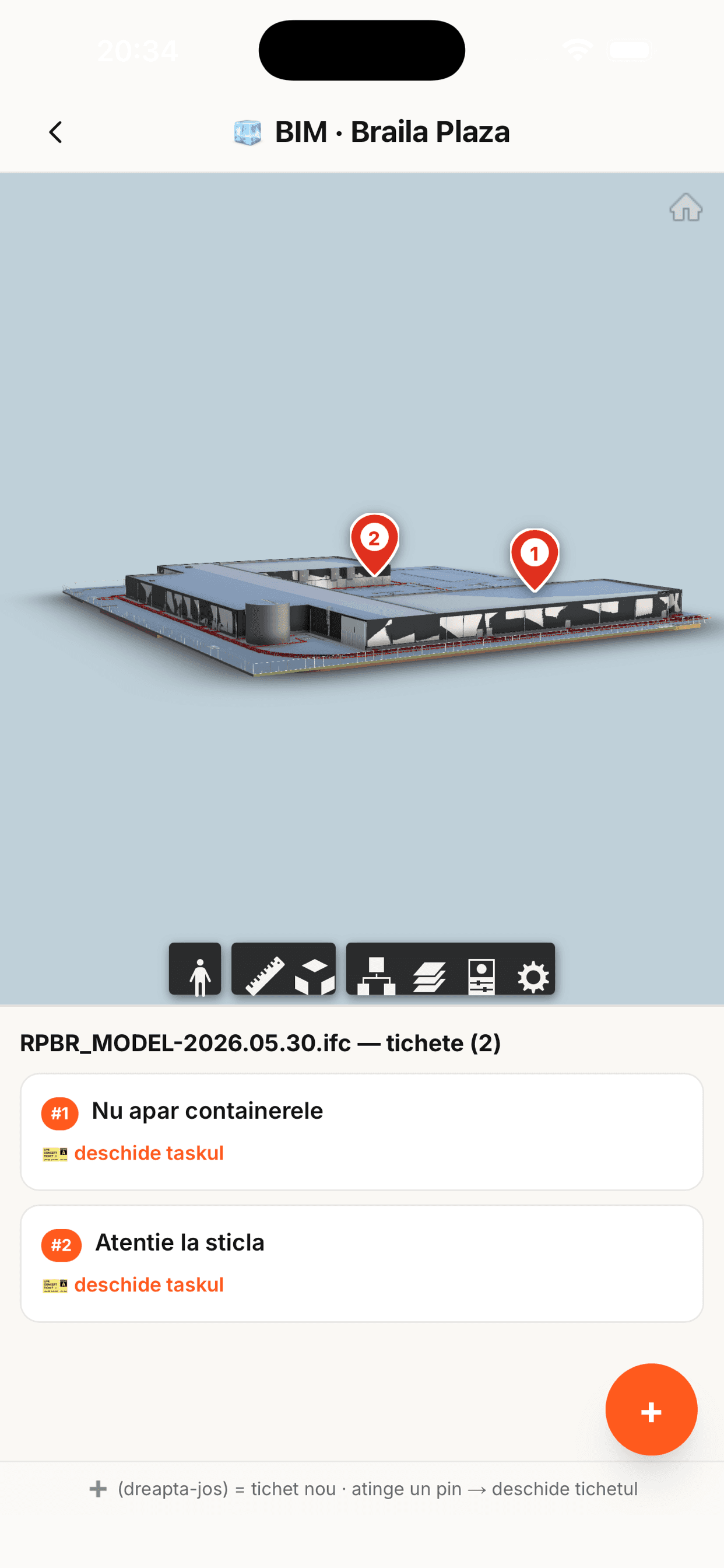
Drop a pin on a drawing or on the 3D model and it becomes a real ticket: a responsible person, a discipline, a deadline, a photo. It appears in that contractor's task list and closes there. The pin and the task are the same object, so nothing is tracked twice.
Full IFC and Revit models open in the browser and on the iPhone — one of the very few places you can turn a real 3D model in your hand, on site, with nothing to install.
📐 2D and 3D, one ticket system
A defect raised on the model and one raised on the plan land in the same place, with the same owner and the same deadline.
04 · Lease management
The rent roll, and the relationship that comes with it.
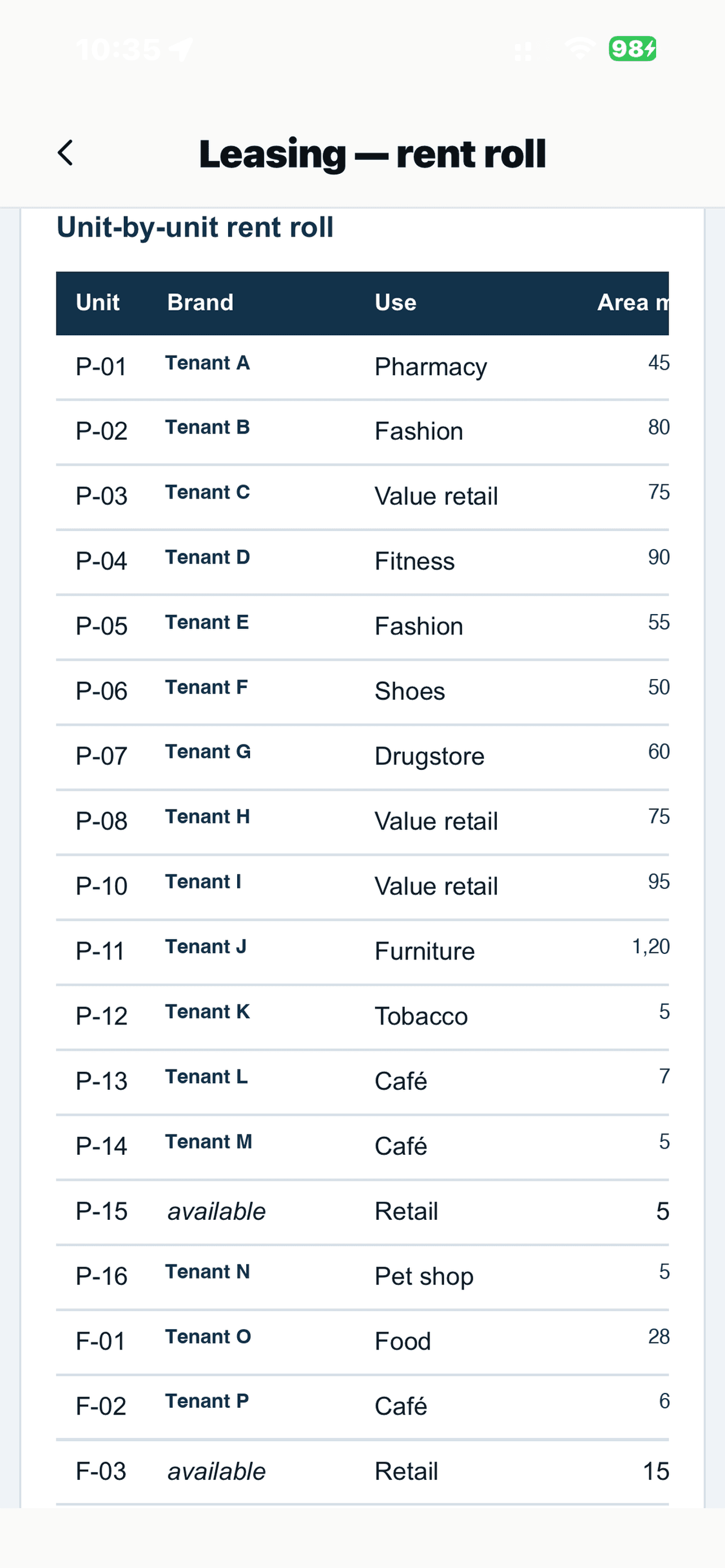
Signed, agreed and in negotiation per project — areas, rents, and the share of GLA committed — with the leasing dashboard on top and the floor plans underneath it.
Each tenant gets a dedicated space where the relationship actually lives: their requests and tickets, their documents, the shared plans, the site progress they care about. They see their own space and nothing else; you see all of them.
🏬 Leasing next to the numbers
The rent roll is part of the investment story, so it sits alongside the underwriting rather than in someone's separate spreadsheet.
05 · The Agenda
A planning system in its own right — the part we're proudest of.
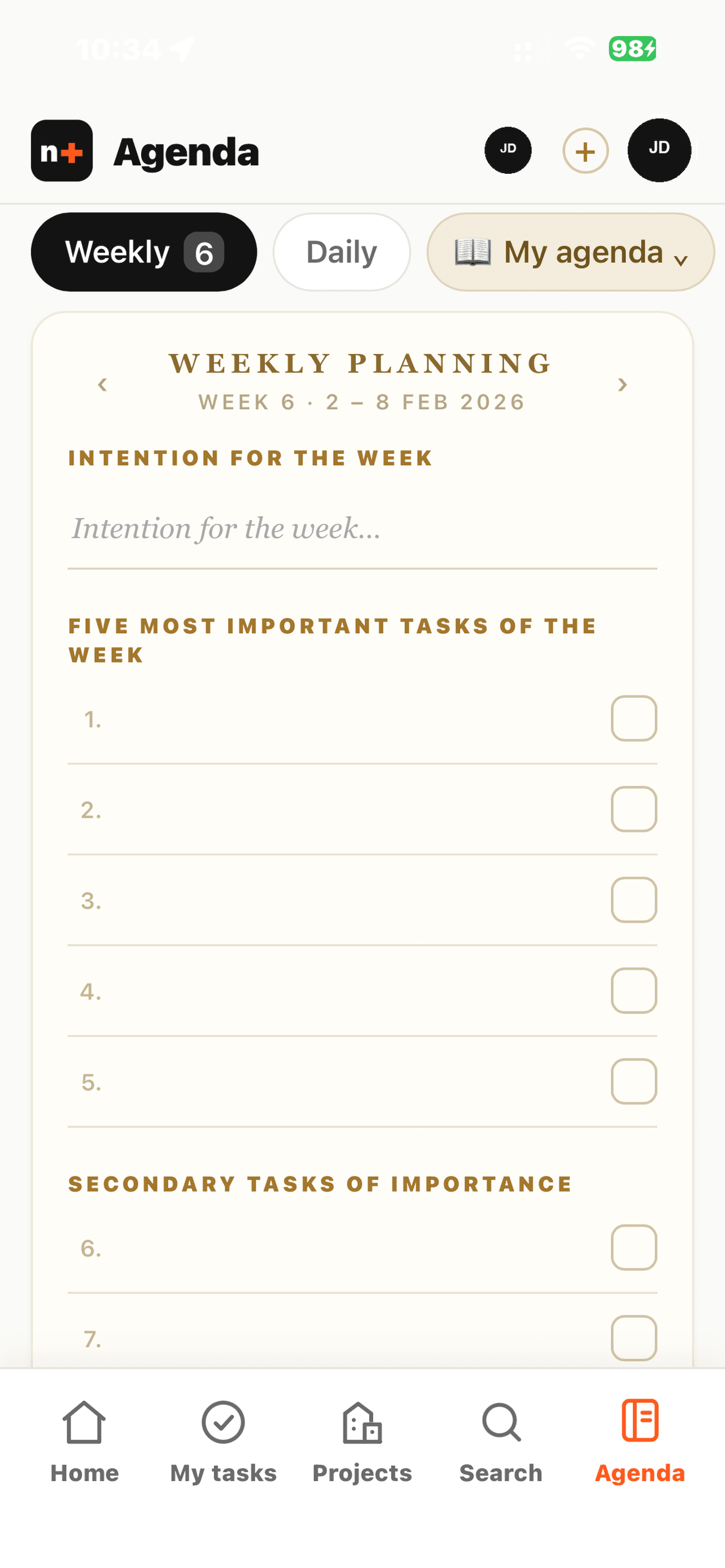
Not a to-do list bolted onto a project tool. You plan the week, then each day: the intention for the week, the highlight of the day, primary and secondary priorities, calls to make, e-mails to send, payments to action, checklists.
Anything left open rolls forward from previous weeks instead of quietly disappearing. Items repeat when you want them to. Pull in your project tasks, or keep it entirely separate. Several time zones side by side, and meetings can go out with a Google Meet link.
It holds its own against dedicated planning apps — and most of us open it before anything else.
🔒 Your agenda is yours alone
It lives in your personal space, which is visible only to you — not to your colleagues, and not to an administrator either. That's enforced by the system itself: the ownership check runs before any admin permission, so whatever you write there stays private unless you explicitly choose to share it.
Also inside
And the rest of what a project needs.
06
Design & Permitting
The permit tracker — CU, ISU, avize, Autorizație de Construire — with target dates and current status, so the critical path is visible without anyone having to chase it.
07
Investor area
The underwriting in one place: NOI, valuation and exit yield, the full cost base line by line, the financing structure and the P&L down to distributable profit.
08
The financial side
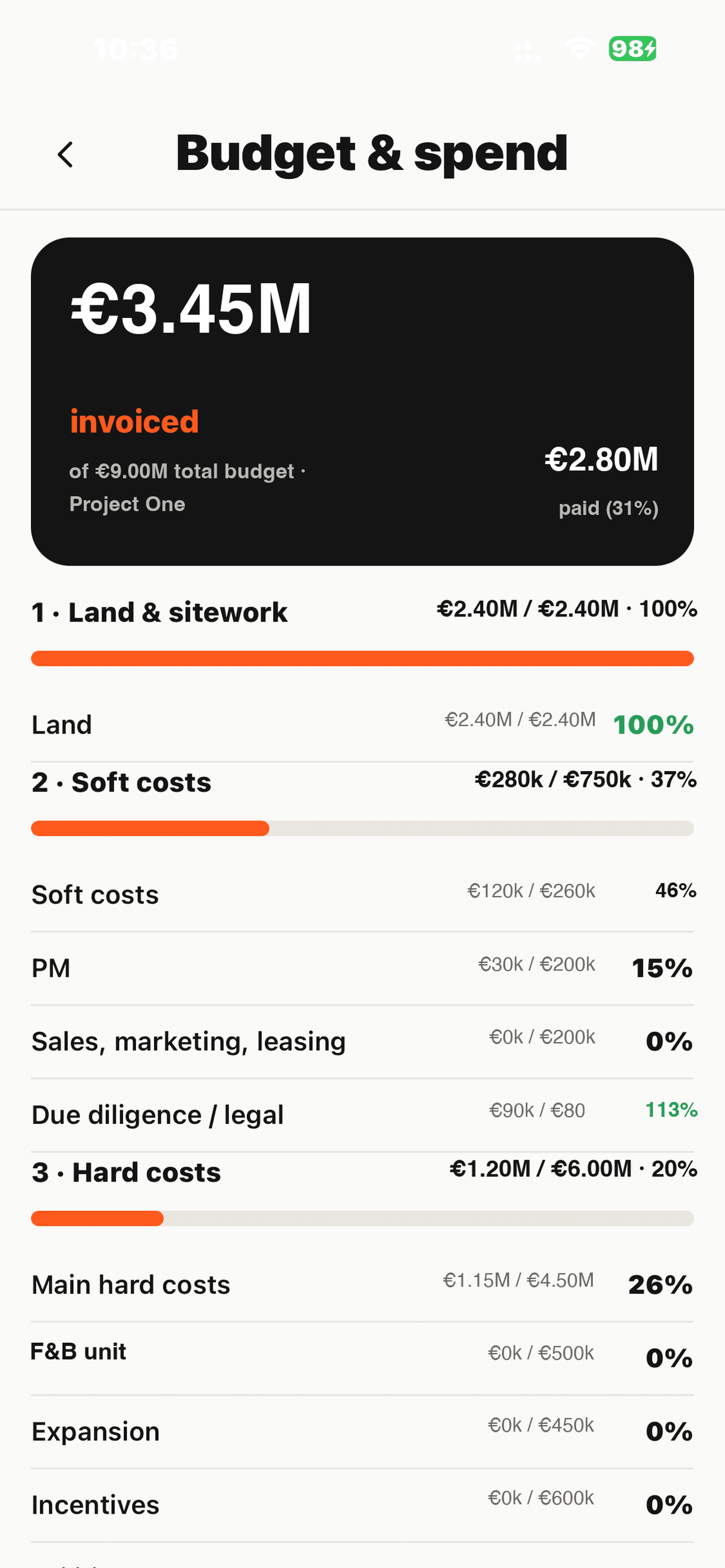
Budget and spend per project, contract by contract: budgeted, invoiced, paid, and what is left. The main works contract carries its certification — payment certificates, retentions and the balance still to pay — next to the schedule those payments are earned against.
09
Task management & project chat
Work organised per project and per team, with owners and deadlines. Every project has its own chat, so a decision stays next to the work it belongs to instead of disappearing into an inbox.
It comes to you
You shouldn't have to go looking for what changed.
🔔
Notifications that reach you
Push straight to your phone when something is assigned to you, mentioned you, or is about to fall due — with sound and vibration, not a badge you notice tomorrow.
🟢
Live Activities for meetings
A meeting runs on your lock screen and in the Dynamic Island — the time and what's next, without unlocking anything.
💬
WhatsApp for what matters
The things that genuinely can't wait can go out over WhatsApp as well, so a reminder lands where people already are.
Integrations & automation
It talks to the tools you already use — and keeps working when nobody is looking.
Google Drive, kept in step
Every project and every list gets its matching folder in the company Drive, created and renamed automatically as the structure changes. Models uploaded for BIM are archived back to the project's own Drive folder, so nothing lives only inside one system.
Live from the finance sheet
Budget and spend read from the contracts-and-payments sheet the finance team already maintains — budgeted, invoiced, paid, per contract line. No re-keying, and no second version of the truth.
Autodesk for the heavy lifting
IFC and Revit models are translated through Autodesk's cloud, so a large federated model opens on a phone. Drawings dropped in as DWG are plotted to PDF automatically.
Scheduled scripts that watch for you
Jobs run on their own schedule: a morning sweep for anything overdue or due today, a check every five minutes for meetings and deadlines about to land, and a nightly backup of the whole workspace. You get told; you don't have to go and look.
E-mail and WhatsApp, where people already are
Assignments, mentions, approvals and reminders go out by e-mail and — for things that genuinely cannot wait — by WhatsApp, straight to the phone of the person who has to act.
Sign in the way you already do
Apple, Google or LinkedIn sign-in, or a normal work e-mail. Meetings can carry a Google Meet link. Nothing new to remember.
AI agents
Seventeen agents. Four you can switch on today.
An agent reads one project and reports back. You switch each one on for a named project — nothing runs on its own, and none of them changes your data. The other 13 are specified and each is waiting on one concrete thing, named on its card, so you can see what it would take rather than a date we made up.
Projects
Projects — without the managing.
Keeping a project moving: status, priorities, updates, scope.
1 of 4 available today.
Status Reporter
Reads the live schedule and reports what is behind target, what has stalled, and what needs a decision this week.
Available now
Priorities Manager
Surfaces what is genuinely urgent this week: due with no owner, overdue and blocking others, quietly slipping.
In build — needs a dependency field on tasks
StandUp Manager
Collects a short update from each team and shares one summary, so nobody has to sit through the round-robin.
In build — needs somewhere to capture a stand-up
Scope Manager
Captures the goal and scope at project start, then flags when work drifts outside what was agreed.
In build — needs a project brief to compare against
Construction
The site — reported without asking.
The site itself: what was built, to what quality, how safely.
3 of 5 available today.
Site Progress
Reads each day's site journal and keeps the schedule honest: who was on site, what actually started, what finished, and which lines the programme still has wrong.
Available now
Accounting
Keeps the budget live from the Cost Management workbook: budgeted, contracted, invoiced, paid and open invoices per line, without anyone retyping it.
Available now
Quality & Snagging
Tracks open tickets on drawings and the 3D model: which discipline, how old, what is not closing.
In build — needs its turn — the ticket data is already there
Safety (SSM)
Watches safety events and near-misses on site, and whether the required checks were actually done.
In build — needs a safety field on the site report
Progress Forecast
Where the finish date is really heading — as a range, with the activities driving it named.
Available now
Leasing
The rent roll — watching itself.
The rent roll, the tenants, and the money the asset makes.
0 of 4 available today.
Lease Pipeline
Movement in the rent roll: what advanced, what went quiet, and which deals have stopped progressing.
In build — needs history on the rent roll
Tenant Care
Open tenant requests and how long they have been waiting, per tenant and per project.
In build — needs its turn, after Lease Pipeline
Void & Expiry Watch
Uncommitted GLA and leases approaching their break or expiry, early enough to act on.
In build — needs break and expiry dates on the rent roll
Investor Pack
Drafts the periodic investor update from the numbers already in the system.
In build — needs a signed-off reporting period
Sales & Rentals
Leads that don't go cold.
Selling apartments and letting the units that are still empty — the enquiry, the match, the viewing, the follow-up.
0 of 4 available today.
Lead Manager
Every enquiry in one place: what they asked for, which units actually fit, who owns it, and which ones have gone quiet and need chasing today.
In build — needs an apartment inventory, and replies logged on enquiries
Social Media
Drafts the listing posts, watches the comments and messages so none sits unanswered, and reports which channel is actually producing enquiries rather than likes.
In build — needs a connected social account
Competitor Watch
What the schemes you compete with are asking per m², what they still have free, and what changed this month — so a price decision is made against the market rather than a hunch.
In build — needs the list of schemes to track
Sales Team Check
Where the pipeline is leaking: leads sitting unattended, enquiries past their response time, viewings booked but never followed up — by stage, and by whose desk it is on.
In build — needs replies and viewings recorded on enquiries
Off until you switch it on
Per project, by an administrator. There is no enable-everywhere control and no agent that arrives switched on, so a project nobody has touched runs none of them.
They read; they do not write
Every agent here produces a report you read. None of them edits a schedule, a task or a number. Anything that would change your data goes to the project's manager as a proposal first.
A monthly credit, and a hard stop
Each project gets a set number of runs a month. The allowance is checked before the model is called, so a project that has used it up stops rather than quietly spending more.
The arithmetic is not left to the model
Where an agent reports a number — a projected finish date, a slip in days — that figure is calculated in ordinary code. The model is given the finished figures and may only explain them.
Coming next
Payment approvals, and tendering
Budget, invoiced and paid are already tracked per contract. What comes next is the rest of the loop: the site's payment applications — situațiile de plată — raised, checked against the schedule and the contract, and approved right where the work they refer to is recorded. No separate spreadsheet, no signature chased by e-mail, and a clear trail of who approved what and when.
After that, tendering — running a package out to bidders, collecting and comparing offers side by side, and keeping the award trail in the same place as the contract that follows it, including the documentation discipline that public tenders demand.
And on the AI side, the parts nobody enjoys: watching the project inbox and filing what arrives against the right contract or ticket, and reading an incoming invoice or payment application to check it against the contract and the schedule before anyone opens it. The agents themselves are listed above, each with its own status.
Start using it today
If you work with us on a project, your account is most likely already set up. Sign in with your work e-mail — and put it on your phone while you're at it.
Trouble signing in? Write to office@nestplus.ro.
Not working with us yet?
Request it for your company
We built this to run our own projects, and it is open to the teams we build with. If you develop, build or manage real estate and want your projects run this way, tell us about your company and we will set you up.
Request for your company